Table of Contents
This page describes how to upgrade the imperix IP in an existing sandbox project, whether to restore compatibility with a newer SDK version or to access recent improvements. It also covers migration from a design targeting a Gen 3 controller (B-Box 3, B-Box Micro, B-Board PRO, TPI8032) to Gen 4 (B-Box 4).
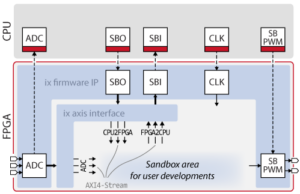
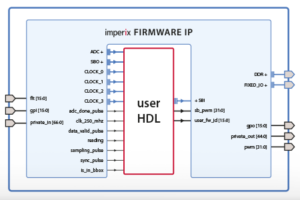
Customizing the FPGA firmware involves instantiating the imperix firmware IP within AMD/Xilinx Vivado to edit the surrounding programmable logic, known as the sandbox. For step-by-step instructions on creating the required FPGA sandbox template, refer to the getting started guide.
Do I need to upgrade?
Upgrading is not always mandatory. Starting with SDK 2024.3, upgrading the SDK no longer requires re-generating the FPGA bitstream.
An upgrade is only needed if:
- The current firmware IP is incompatible with the target SDK version (see table below)
- Access to new features and improvements is desired (see change logs on the download page)
| SDK Version | Compatible imperix IP | Minimal Vivado version required |
|---|---|---|
| 2026.1 | 3.10 Rev. 3 (Gen 3) / 4.0 Rev. 0 (Gen 4) | 2023.2 |
| 2025.1, 2025.2, 2026.1 | 3.10 Rev. 1 | 2022.1 |
| 2024.3, 2025.1, 2025.2, 2026.1 | 3.10 Rev. 0 | 2022.1 |
| 2024.2 | 3.9 Rev. 5 | 2022.1 |
| 2024.1 | 3.9 Rev. 4 | 2022.1 |
| 3.8.x.x | 3.8 Rev. 1 | 2022.1 |
| 3.7.x.x | 3.7 Rev. 1 | 2021.1 |
| 3.6.x.x | 3.6 Rev. 1 | 2019.2 |
| 3.4.x.x / 3.5.x.x | 3.4 Rev. 1 | 2019.2 |
How to upgrade the imperix firmware IP
The table below indicate which procedure to follow to update the imperix firmware IP to the latest version.
- Procedure A – Simple file replacement. The imperix firmware IP is pin-compatible; no block design changes needed.
- Procedure B – Interface changes require reconnecting signals in the block design.
| imperix firmware IP version | SDK Version | Upgrade required for SDK 2026.1? | Procedure to follow |
|---|---|---|---|
| 3.10 Rev. 0–2 | 2024.3 to 2025.2 | No | Procedure A |
| 3.9 Rev. 5 | 2024.2 | Yes | Procedure A |
| 3.9 Rev. 4 and older | 2024.1 and older | Yes | Procedure A then Procedure B |
How to find the current imperix IP version
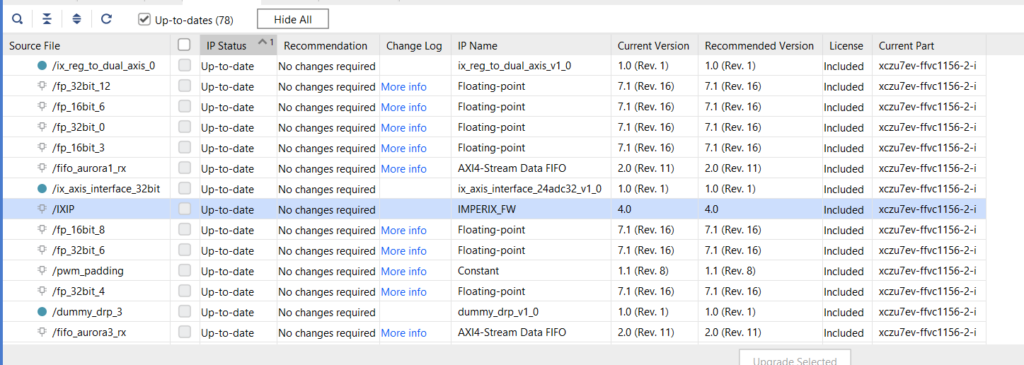
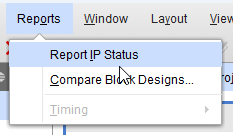
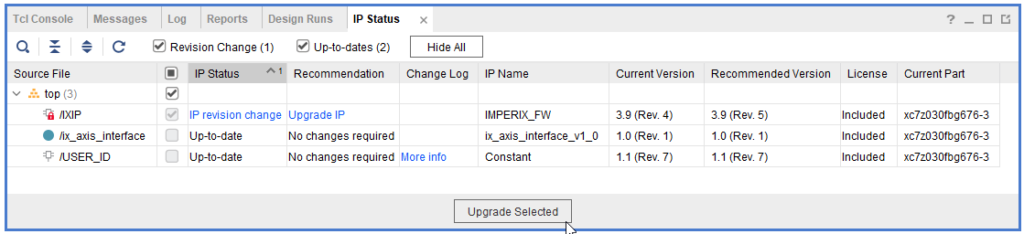
In Vivado, go to Reports → Report IP Status and look for the IMPERIX_FW IP. The version is shown in the “Current Version” column. If no revision number is displayed, the revision is 0.
Procedure A: Update imperix files
From 3.9 Rev. 4 onwards, the imperix IP is pin-compatible, so no block design changes are needed. The procedure only consists of updating the source files and clicking “Generate Bitstream.”
Steps:
- Recommended: back up the entire project before making any changes.
- Download the
FPGA_Sandbox_template_*.zipfor the target SDK version from the Downloads page and unzip it. - Replace IP folders: In
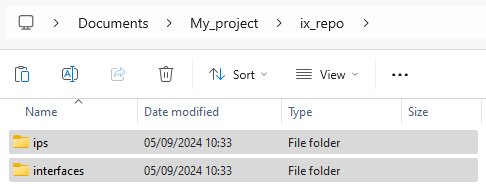
<project_dir>/ix_repo/, replace theinterfacesandipsfolders with those from the downloaded template.
- Replace constraints file:
- Copy the new constraints file to
<project_dir>/constraints/ - If custom modifications were made (e.g., USR pins), transfer those changes to the new file
- Copy the new constraints file to
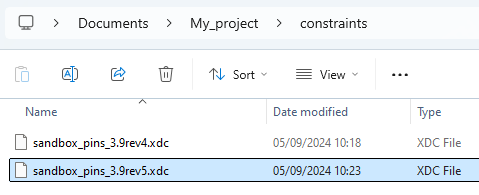
- Update Vivado project:
- Open the Vivado project
- Remove the old constraints file from Sources
- Add the new constraints file
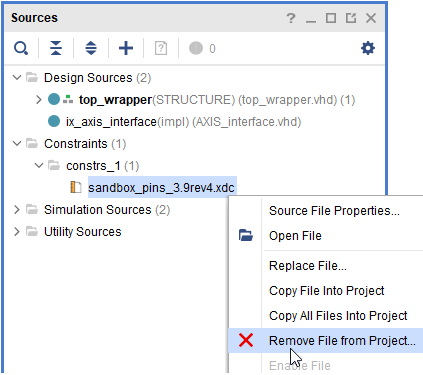
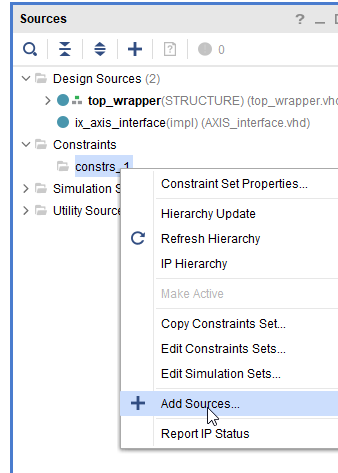
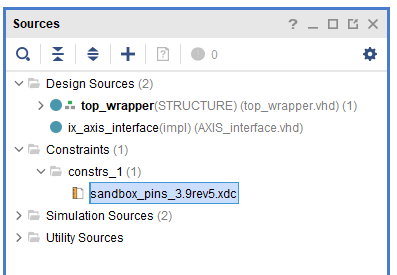
- Upgrade the IP:
- Open the Report IP Status
- Right-click the imperix IP block → Upgrade IP
- Warnings during upgrade are to be expected
Procedure B: Update block design
Versions prior to 3.9 Rev. 4 introduced interface changes that are not pin-compatible. The procedure involves reconnecting signals in the block design and updating HDL files.
- Back up the entire project before making any changes.
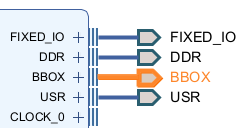
- Connect the new
BBOXinterface to the top-level interface port.
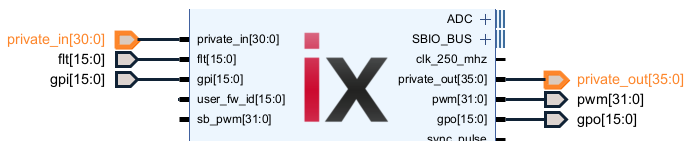
- Update the top-level ports for
private_inandprivate_outto match the new sizes.
- Regenerate the HDL wrapper:
- Delete
top_wrapper.vhd - Close the project
- Reopen the project
- Right-click block design → Create HDL Wrapper
- Delete
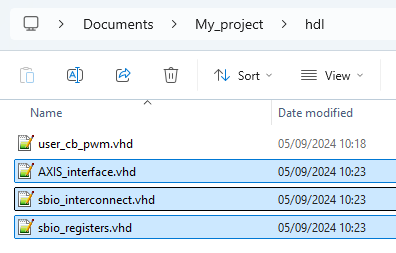
- Update HDL files in
<project_dir>/hdl/:- Replace
AXIS_interface.vhdwith the new version - Add
sbio_interconnect.vhdandsbio_registers.vhd
- Replace
- Add sources in Vivado: Add the new
.vhdfiles to the project sources.
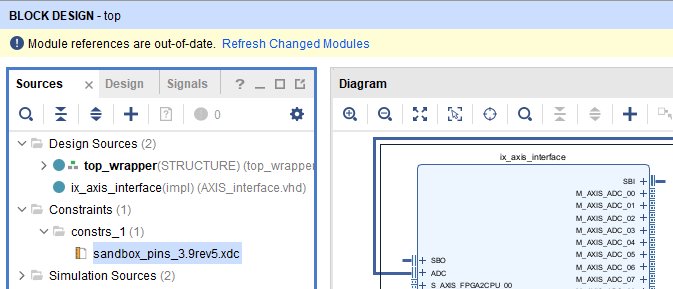
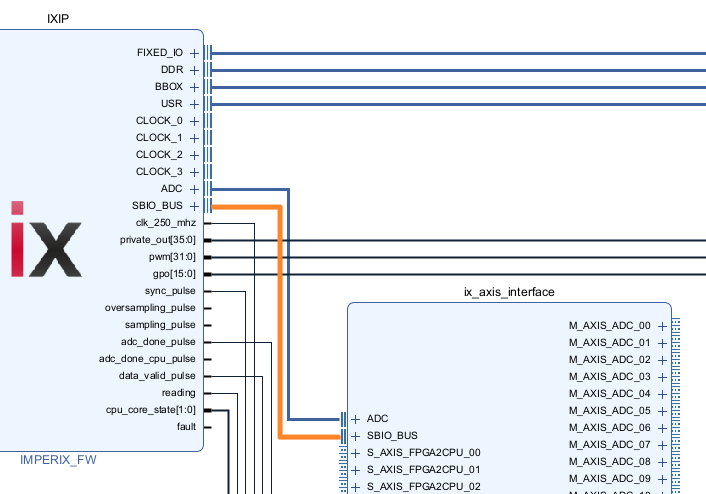
- If using AXI-Stream interface:
- Click Refresh Changed Modules in Vivado
- Connect the
SBIO_BUSinterface between the imperix IP and AXIS_interface
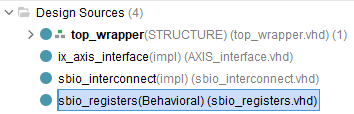
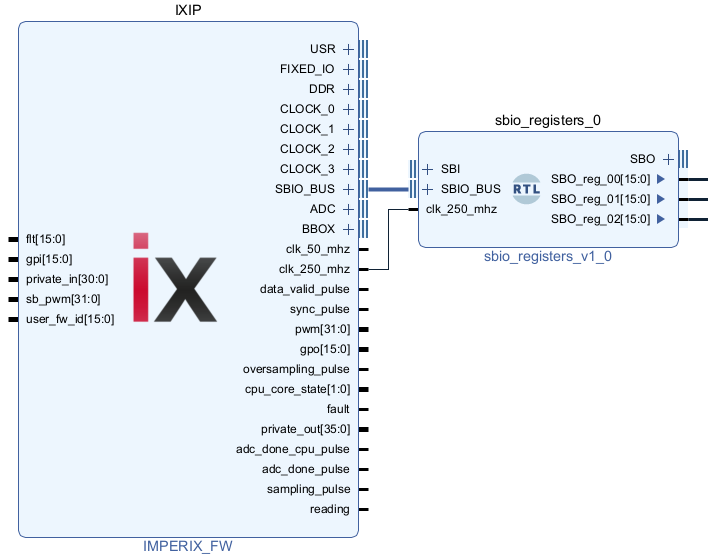
- If using SBI/SBO registers:
- Add the
sbio_registersmodule to the block diagram - Connect existing logic to
sbio_registers(which now provides the SBI/SBO interfaces) - Connect
SBIO_BUSfrom the imperix IP tosbio_registers
- Add the
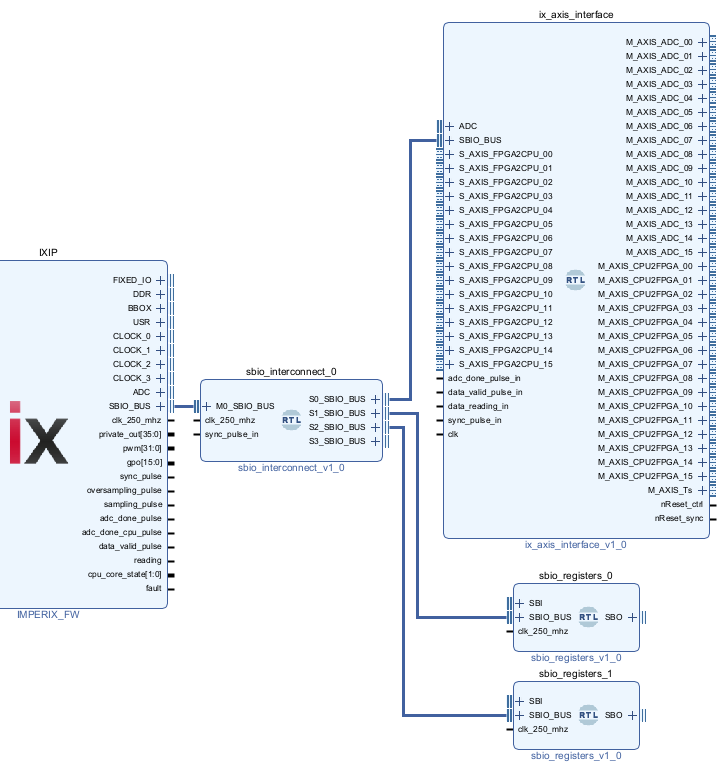
- If multiple SBIO interfaces are needed
- Add
sbio_interconnectto the block diagram - Connect it to the
SBIO_BUSport of the imperix IP - Use the interconnect’s multiple output ports for the relevant modules
- Add
Upgrading a project from Gen 3 to Gen 4
This guide covers the migration of an existing FPGA sandbox project from Gen 3 (imperix IP 3.10+) to Gen 4 (imperix IP 4.0) hardware.
Migration Procedure
- Back up the entire project before making any changes.
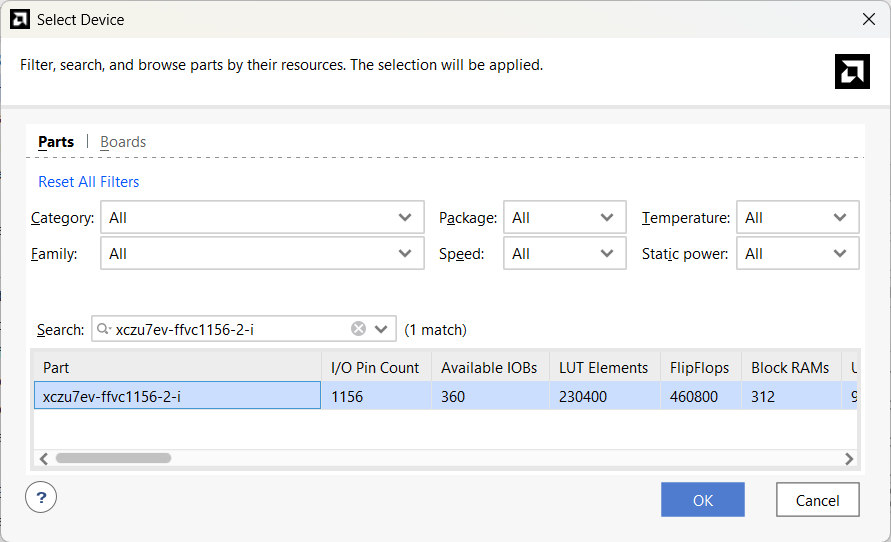
- Change the Target Device
- Open the project in Vivado 2023.2 or later
- Go to Settings → General → Project device
- Change the device from
xc7z030fbg676-3toxczu7ev-ffvc1156-2-i
- Replace the imperix IP
- Navigate to the project directory:
<project_dir>/ix_repo/ips/ - Delete the existing imperix IP folder
- Copy the imperix IP from the Gen 4 template (
ix_repo/ips/) into the project
- Navigate to the project directory:
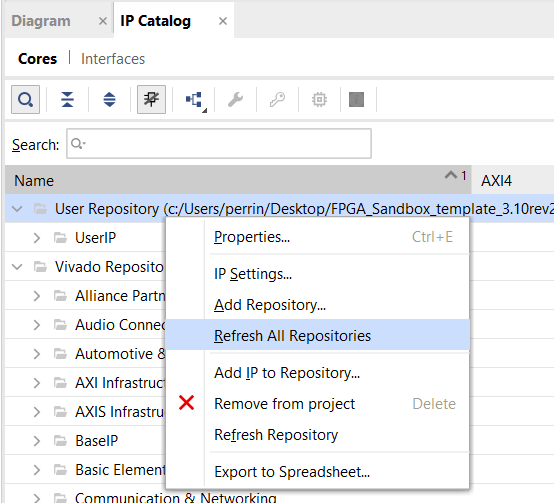
- Refresh IP Repositories
- In Vivado, open the IP Catalog
- Right-click and select Refresh All Repositories
- Upgrade IPs
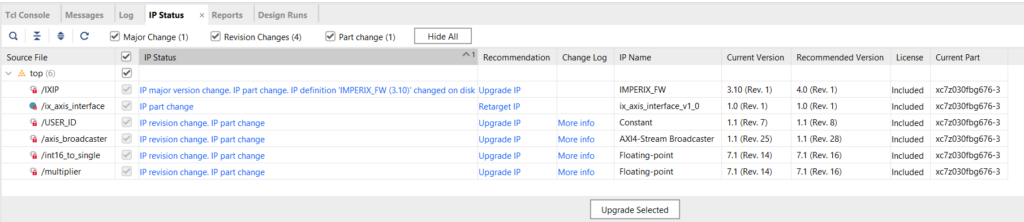
- Open the IP Status window (Reports → Report IP Status)
- Click Rerun to refresh the status
- Select all outdated IPs and click Upgrade Selected
- Warnings during upgrade are to be expected
- Replace the Constraints File
- If custom modifications were made to the constraints file, those changes must be manually transferred to the new file.
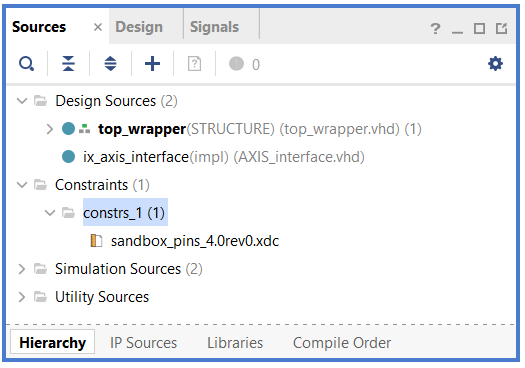
- Copy the constraints file from the Gen 4 template (
constraints/) to the project’sconstraints/folder, replacing the old file - In Vivado, go to the Sources tab
- Remove the old constraints file from the project
- Add the new constraints file
- Update Block Design Ports
The Gen 4 design has different external ports. Several ports from Gen 3 no longer exist or have changed sizes, and new ports must be created.
| Action | Signals / Ports |
| Remove | flt, gpi, gpo, pwm, private_in, private_out |
| Keep | BBOX, DDR, FIXED_IO |
| Create | private_in, din, dout, private_io, private_out |
There are two options for this step:
Option A: Automated Script (Recommended)
If no custom use of external ports (such as gpi or pwm) was made, the provided Tcl script can automate the port changes.
1. Download the migration script:
2. Unzip it and place it in the scripts/ folder at the root of the project
3. In the Vivado Tcl Console, run:
cd [get_property DIRECTORY [current_project]]
source ../../scripts/gen3_to_gen4_migration.tcl
Code language: Tcl (tcl)
The script will remove obsolete ports, create and connect new external ports, and regenerate the HDL wrapper.
Option B: Manual Update
1. In the block design, delete the obsolete ports listed above
2. On the IXIP block, right-click the private_in, din, dout, private_io, and private_out pins and select Make External.
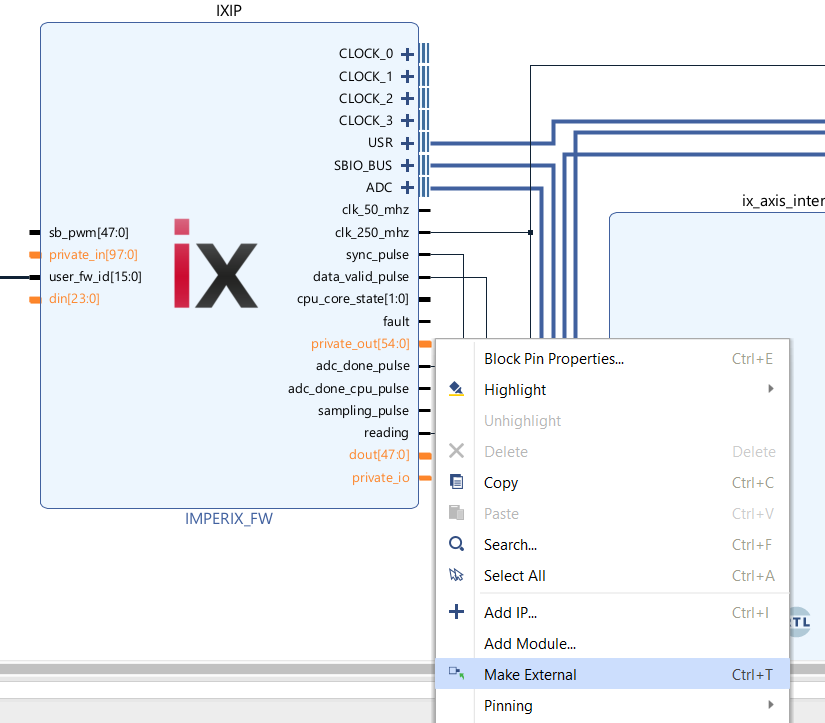
3. Rename each new port by removing the _0 suffix
4. In the Sources tab, delete the existing top_wrapper.vhd (or .v)
5. Right-click on the block design file and select Create HDL Wrapper
6. Wait for Vivado to finish updating
Additional considerations
Accessing additional ADC channels with the AXI4-Stream interface
Gen 4 provides 24 ADC channels compared to 16 on Gen 3. To access the additional channels replace AXIS_interface.vhd with AXIS_interface_24adc.vhd
AXIS_interface.vhd remains compatible but only provides access to 16 of the 24 channels.Updating the PWM port width
The sb_pwm port has been extended from 32-bit to 48-bit. If the design uses this port, update the signal width to avoid warnings.
Using SFP port with Aurora IP
If the Gen 3 project uses Aurora for SFP communication, manual work is required to port the design. The Aurora IP configuration and interfaces have evolved between device families, so parameter settings and connections will likely need adjustment.
Final verification
After completing the migration, we recommend to:
- Run Validate Design on the block design
- Run synthesis and review any warnings
- Verify that all custom logic connections are intact
Legacy IPs for older SDKs
For users who need to maintain older projects.
| C++ or ACG SDK | imperix IP version | Minimal Vivado version required | Download |
|---|---|---|---|
| 3.4.x.x 3.5.x.x | 3.4 Rev. 1 | 2019.2 | sandbox_sources_3.4.zip |
| 3.6.x.x | 3.6 Rev. 1 | 2019.2 | sandbox_sources_3.6.zip |
| 3.7.x.x | 3.7 Rev. 1 | 2021.1 | sandbox_sources_3.7.zip |
| 3.8.x.x | 3.8 Rev. 1 | 2022.1 | sandbox_sources_3.8.zip |
| internal only | 3.9 Rev. 1 to 3 | 2022.1 | internal only |
| 2024.1 | 3.9 Rev. 4 | 2022.1 | Sandbox_template_3.9rev4.zip |
| 2024.2 | 3.9 Rev. 5 | 2022.1 | Sandbox_template_3.9rev5.zip |
 By Benoît Steinmann • September 5, 2024 • PN117