
Table of Contents
This document provides instructions for configuring CPU-based multi-rate control for imperix controllers using PLECS with the ACG SDK. It allows executing part of the control algorithm at a slower rate, without violating real-time constraints. This is typically useful for running supervisory logic, slow outer control loops, energy management, or MPPT algorithms.
This page provides PLECS-specific configuration instructions. PN265 provides a more general introduction to multi-rate control.
Single-tasking and multitasking configurations
Imperix users can choose between single-tasking and multitasking approaches to execute their multi-rate control algorithms. Single-tasking runs all execution rates sequentially within a single, monolithic control task, whereas multitasking utilizes priority-based task scheduling with preemption, as detailed in PN265.
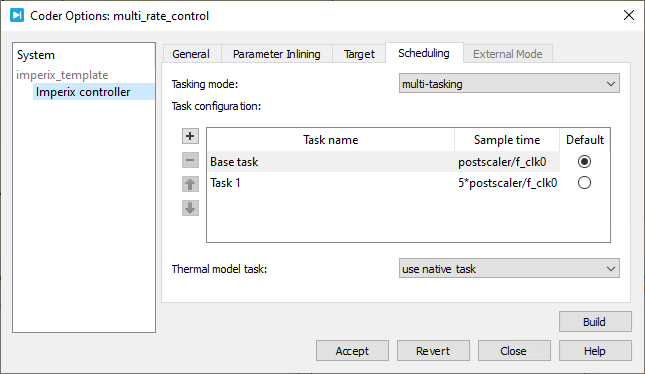
By default, PLECS is configured in single-tasking mode. To enable multitasking, set the Tasking mode to multi-tasking in the Scheduling tab of the Coder Options dialog.
Base rate and sub-rates configuration
In PLECS, the base rate, which corresponds to the controller’s CPU interrupt rate, is defined in the Config block via the CLK0 frequency and the optional postscaler parameters, as explained in PN137.
Configure sub-rate tasks in the Scheduling tab of the Coder Options, as shown below. Because sub-rate tasks must have a sample time that is an integer multiple of the base rate, it is recommended to define their sample time explicitly (as shown in the example below) to prevent configuration errors.
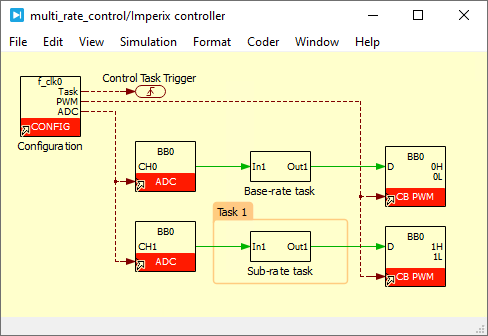
Now that the sub-rate task is defined in the Coder Options, assign it in the model using a Task Frame, as shown below. All components enclosed within the frame execute inside the selected task. The illustrative example below shows a Task Frame surrounding a subsystem that assigns its execution to Task 1, which was configured earlier to run 5 times slower than the base rate.
Application example
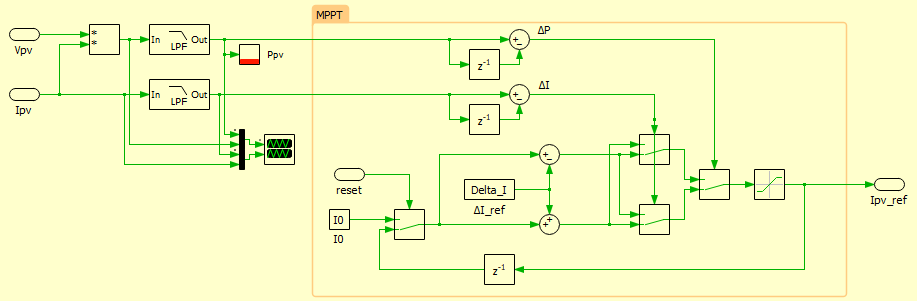
An example of use is presented in Maximum Power Point Tracking (MPPT) (TN117). It shows how one part of the control (in the MPPT task below) can be executed at a slower rate than the main control code.
 By Julien Orsinger • March 29, 2021 • PN142
 By Nicolas Cherix • March 25, 2021 • TN117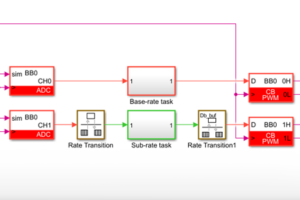
 By Benoît Steinmann • March 25, 2021 • PN145