Usually, the user programs the imperix controller’s CPU using imperix ACG SDK or C++ SDK, and uses the pre-implemented FPGA peripherals such as the ADC drivers or PWM generators. Nevertheless, advanced users can also directly program the FPGA to implement high-performance algorithms, interface with specialized peripherals, or implement high-speed communications with other devices.
This page summarizes the documentation pages relating to FPGA development on imperix controllers.
Starting an FPGA development project
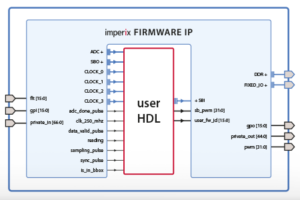
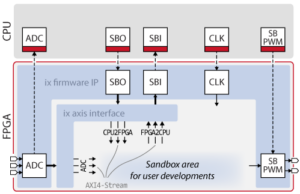
Imperix offers the possibility to customize its FPGA firmware by instantiating the imperix firmware IP in AMD Vivado and editing programmable logic around it, in a workspace referred to as the FPGA sandbox.
The first step to start editing the FPGA consists of installing AMD Vivado Design Suite, which is available for free as the ML Standard (or WebPACK) edition.
The user can then download the necessary source files and create the sandbox template by following these guides:
- PN117: Download of the imperix firmware IP for FPGA sandbox
- PN159: Getting started with FPGA programming
After setting up its environment, the user should familiarise himself with the essential aspects of FPGA developments on imperix controllers by reading the following pages:
- PN116: Imperix firmware IP product guide
- PN126: Retrieving ADC measurements from the FPGA
- PN128: Exchanging data between the CPU and the FPGA
- PN127: Driving the PWM output chain
After the basics are mastered, the following advanced product notes can be explored:
- PN129: Using an ILA to debug an FPGA design
- PN179: Accessing the USR pins in the FPGA sandbox
- PN118: Example of FPGA-based Aurora communication
Learning about automated generation tools for FPGA
Traditionally, FPGA designs are implemented using HDL languages such as VHDL or Verilog. However, the user can use automated code generation tools to design FPGA modules without writing any line of any HDL language. These tools can be separated into two main categories: HDL tools and HLS tools.
HDL-level tools
These tools provide a graphical or model-based interface while still granting the developer low-level hardware control, right down to individual flip-flops. Because they operate at the register-transfer level, the design process remains conceptually very close to writing raw VHDL or Verilog. They are recommended to implement peripherals such as custom PWM modulators or communication interfaces.
- PN161: Xilinx System Generator introduction (now AMD Vitis Model Composer HDL)
- PN162: MATLAB HDL Coder introduction
High-Level Synthesis (HLS) tools
Unlike HDL-level tools, High-Level Synthesis tools abstract away the low-level hardware architecture. They are particularly well-suited for designing advanced control algorithms, working with complex data types, and implementing sophisticated mathematical functions without needing to manage the underlying register-level timing.
Implementing closed-loop control of a buck converter in FPGA
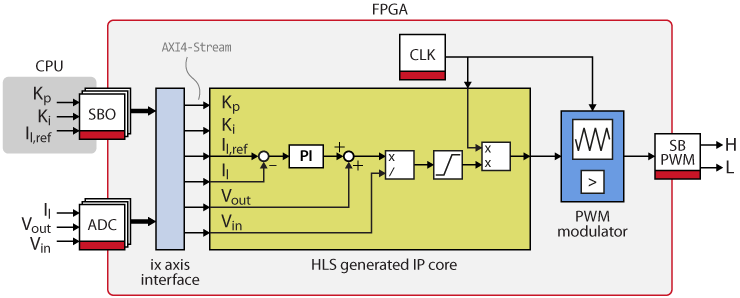
The following notes show a step-by-step example of how to implement the closed-loop control of a buck converter in FPGA.
The first page presents three ways of implementing a custom triangular carrier PWM modulator, using VHDL or code generation tools such as AMD Vitis Model Composer HDL (formerly System Generator) or MATLAB HDL Coder.
TN141: Custom FPGA PWM modulator implementation
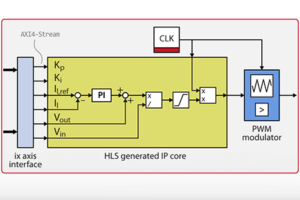
The second page explains how to create a PI-based current controller for a buck converter using high-level synthesis (HLS) tools such as Model Composer and Vitis HLS.
TN142: PI-based current controller for a buck converter
Executing power converter control algorithms on an FPGA
The FPGA-based control of a grid-tied inverter example shows how an entire control algorithm can be ported to the FPGA and reach a control frequency above 650 kHz.
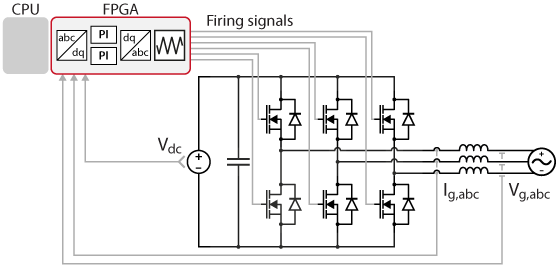
TN147: FPGA-based control of a grid-tied inverter
This example also demonstrates how High-Level Synthesis tools can be leveraged to generate complex FPGA modules such as a grid synchronization module with dq-PLL or a dq current control.
TN143: FPGA implementation of a PLL for grid synchronization
TN144: DQ current control using FPGA-based PI controllers
Implementing communication with other devices
FPGA can also be used to implement high-speed communication with other devices such as hardware-in-the-loop (HIL) or third-party FPGA. The following page details how SFP ports can be used to communicate using the Aurora protocol.
PN118: Example of FPGA-based Aurora 8B/10B communication
PN109: SFP communication with third-party devices
PN110: Aurora link with OPAL-RT via SFP
PN111: Aurora link with Plexim via SFP
PN122: SFP communication with an RTDS MMC simulator
Additional examples
FPGA-based SPI communication IP for A/D converter
FPGA-based Direct Torque Control using Vivado HLS
FPGA-based hysteresis controller for three-phase inverter using HDL Coder
FPGA-based hysteresis current controller for three-phase inverter
 By Benoît Steinmann • June 2, 2021 • PN159