CAN in - CAN input mailbox

The CAN_in block implements an input mailbox that supports receiving messages using the CAN bus protocol. To send messages, the CAN out block should be used instead. The supported CAN protocol variants are as follows:

  • CAN 2.0A: standard format (11-bit identifier), up to 8 bytes payload
  • CAN 2.0B: extended format (29-bit identifier), up to 8 bytes payload
  • CAN FD: standard and extended format, up to 64 bytes payload

CAN 2.0A/B are supported on all imperix controllers, provided that the related hardware exists. However, CAN FD (flexible data) is only supported on the B-Box 4. The detailed compatibility list is shown below.

CANopen is a high-level protocol (OSI layer 7), which should not be confused with CAN (OSI layers 1 and 2). It is currently not supported on imperix equipment.

ControllerHardware resourcesCAN 2.0ACAN 2.0BCAN FD
B-Box 42x channels (one RJ45 socket for each)
Max. 5 Mbps (FD)
YesYesYes
B-Box 3 (RCP)1x channel (one RJ45 socket)
Max. 1 Mbps
YesYesNo
B-Board 3 (PRO)1x channel (Tx/Rx pins or D-sub on EVM)
Max. 1 Mbps
YesYesNo
B-Box microN/ANoNoNo
TPI 80321x channel (two common RJ45 sockets)
Max. 1 Mbps
YesYesNo
Supported variants of the CAN protocol on imperix controllers

Parameters

Addressing

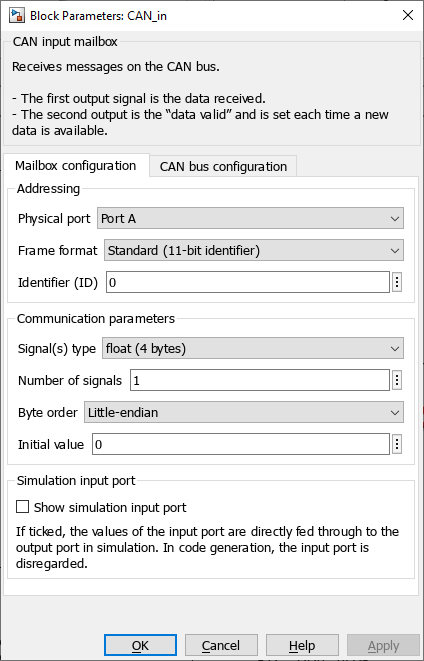
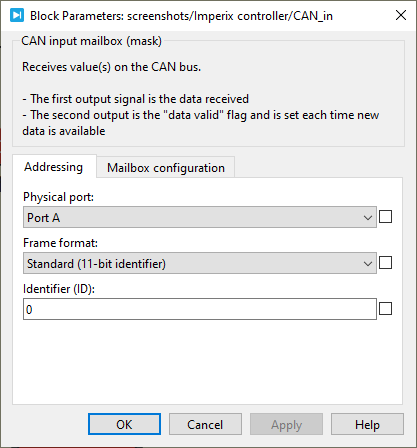
  • Physical port: selects the port on which the mailbox operate. Port B is only available for B-Box 4. For all the other devices, Port A must be selected.
  • Frame format: selects between Standard (11-bit identifier) and Extended (29-bit identifier).
  • Identifier (ID): sets the CAN identifier.

Communication parameters

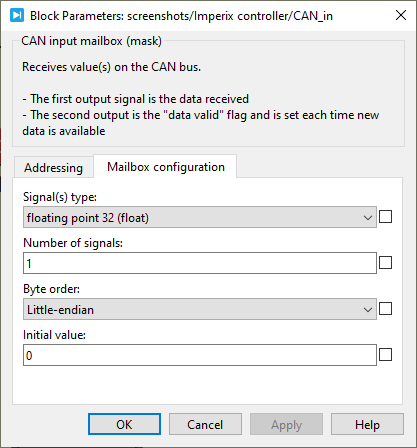
  • Signal(s) type: defines the data type accepted in the data input (int8, int16, int32, uint8, uint16, uint32, float32, or float64).
  • Number of signals: specifies the vector size of the data to be sent.
  • Byte order: defines the byte order in which the data will be sent. Either little-endian or big-endian.
  • Data transmission mode: selects when the data is sent.
    • On-demand: the user manually triggers the message transmissions.
    • Periodically: the message is sent periodically, whether the data has been changed or not.
  • Initial value: sets the initial data value of the data output before any data are received.

CAN bus configuration

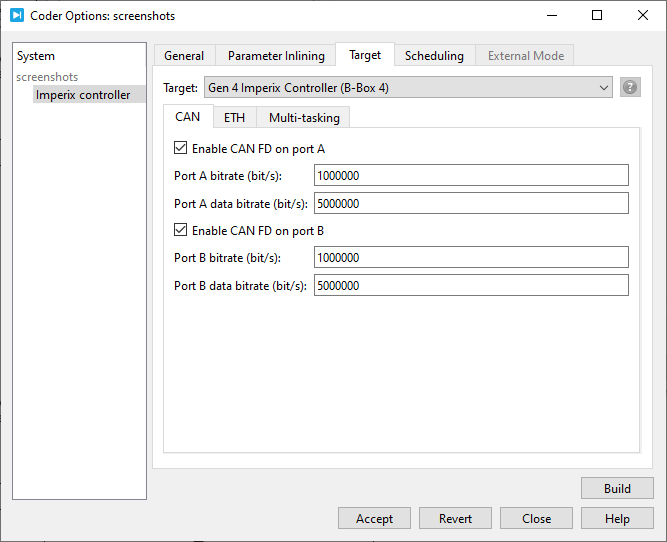
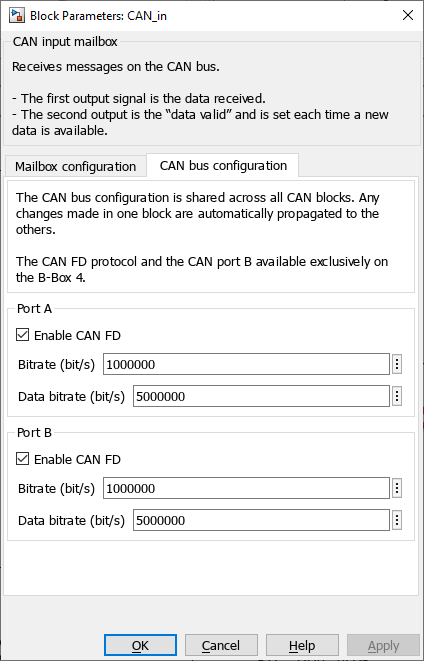
In Simulink, the CAN bus configuration is performed from within the CAN block. In PLECS, the configuration is performed in the Target tab of Coder options windows (Coder -> Coder options, or Ctrl+Alt+B).

  • The bitrate is the rate at which bits are transmitted on the bus (up to 1 Mbps),
  • The data bitrate is the increased bitrate used to transmit the CAN FD frame payload when the Bit Rate Switch (BRS) is enabled (up to 5 Mbps).
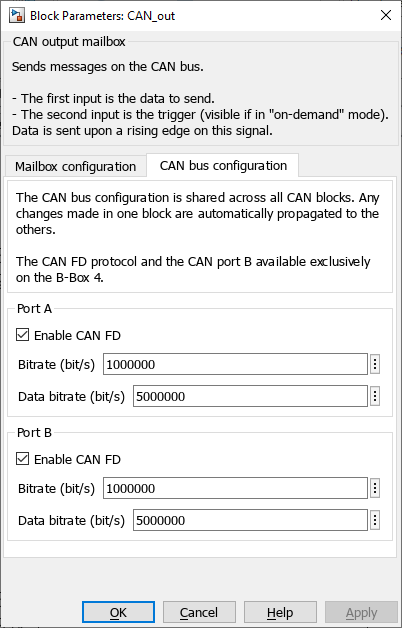
CAN bus configuration in Simulink
CAN bus configuration in PLECS

Simulink block

Signal specification

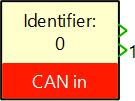
  • The data output signal returns a vector containing the data read from the CAN bus. The vector length can be configured with the  Number of signals parameter. The output data type is configured by the Signal type parameter.
  • The second signal is the data valid output. It is set to 1 each time new data are available.
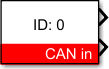
Mask
PLECS block

Signal specification

  • The data output signal returns a vector containing the data read from the CAN bus. The vector length can be configured with the  Number of signals parameter. The output data type is configured by the Signal type parameter.
  • The second signal is the data valid output. It is set to 1 each time new data are available.
Mask
C++ functions

void Can_ConfigureCanBus(unsigned int baudrate);Code language: C++ (cpp)

Configures the baud rate of the CAN bus. Baud rates up to 1 Mbit/s are supported.

It has to be called in UserInit().

Parameters

  • baudrate: Baud rate of the CAN bus in bit/s (up to 1’000’000 bit/s)
bool Can_ConfigureInputMailbox(unsigned int mailboxId, unsigned int canAddress, unsigned int dataLength, tEndianness endianness = LITTLE_ENDIAN);Code language: C++ (cpp)

Configures a CAN input mailbox.

It has to be called in UserInit().

Parameters

  • mailboxId: a unique ID used to distinguish mailboxes from each other. This ID must be unique throughout the code for all ETH and CAN input/output mailboxes.
  • canAddress: sets the CAN input mailbox address. If a CAN frame with a matching address is received the frame data is stored in the mailbox and can be read using the Can_Read() function. The CAN address range is 0 to 2047 (11 bits).
  • dataLength: number of bytes of data to read from the CAN bus (1 to 8 bytes).
  • endianness: defines the bytes order (BIG_ENDIAN or LITTLE_ENDIAN).

Return value

  • bool: returns false if too many output mailboxes were created or if canAddress is out of range.
void Can_ConfigureInputMailboxInitialValue(unsigned int mailboxId, uint64_t data);Code language: C++ (cpp)

Configures the initial value returned by the Can_Read() function before any CAN frame is received in the mailbox.

It has to be called in UserInit().

Parameters

  • mailboxId: a unique ID used to distinguish mailboxes from each other. This ID must be unique throughout the code for all ETH and CAN input/output mailboxes.
  • data: default data which will be returned by any call of Can_Read() before data is received on the CAN input mailbox.
// 64-bit (8 bytes) types: uint64, int64 and double
int Can_Read(unsigned int maildboxId, uint64_t& data); //8 bytes
int Can_Read(unsigned int maildboxId, int64_t& data); //8 bytes
int Can_Read(unsigned int maildboxId, double& data); //8 bytesCode language: C++ (cpp)

// 32-bit (4 bytes) types: int32, uint32 and float
// dataLow represents the bytes 0, 1, 2 and 3
// dataHigh represents the bytes 4, 5, 6 and 7
int Can_Read(unsigned int maildboxId, unsigned int& dataLow, unsigned int& dataHigh); //8 bytes
int Can_Read(unsigned int maildboxId, unsigned int& dataLow); //4 bytes
int Can_Read(unsigned int maildboxId, int& dataLow, int& dataHigh); //8 bytes
int Can_Read(unsigned int maildboxId, int& dataLow); //4 bytes
int Can_Read(unsigned int maildboxId, float& dataLow, float& dataHigh); //8 bytes
int Can_Read(unsigned int maildboxId, float& dataLow); //4 bytesCode language: C++ (cpp)
// 16-bit (2 bytes) types: int16 and uint16
// dataLow represents the bytes 0 and 1
// dataMedLow represents the bytes 2 and 3
// dataMedHigh represents the bytes 4 and 5
// dataHigh represents the bytes 6 and 7
int Can_Read(unsigned int maildboxId, uint16_t& dataLow, uint16_t& dataMedLow, uint16_t& dataMedHigh, uint16_t& dataHigh); //8 bytes
int Can_Read(unsigned int maildboxId, uint16_t& dataLow, uint16_t& dataMedLow, uint16_t& dataMedHigh); //6 bytes
int Can_Read(unsigned int maildboxId, uint16_t& dataLow, uint16_t& dataMedLow); //4 bytes
int Can_Read(unsigned int maildboxId, uint16_t& dataLow); //2 bytes
int Can_Read(unsigned int maildboxId, int16_t& dataLow, int16_t& dataMedLow, int16_t& dataMedHigh, int16_t& dataHigh); //8 bytes
int Can_Read(unsigned int maildboxId, int16_t& dataLow, int16_t& dataMedLow, int16_t& dataMedHigh); //6 bytes
int Can_Read(unsigned int maildboxId, int16_t& dataLow, int16_t& dataMedLow); //4 bytes
int Can_Read(unsigned int maildboxId, int16_t& dataLow); //2 bytesCode language: C++ (cpp)
// array of uint8
typedef struct {
  uint8_t data[8];
} tCanMsg;
 
int Can_Read(unsigned int maildboxId, tCanMsg& canMsg); //1 to 8 bytesCode language: C++ (cpp)

These functions are used to read data received in the input mailbox. The data read will remain unchanged until new data are received.

They have to be called during the control interrupt.

Parameters

  • mailboxId: a unique ID used to distinguish mailboxes from each other. This ID must be unique throughout the code for all ETH and CAN input/output mailboxes.
  • data: data read from the input mailbox. Several data types and prototypes are available. Note that the prototype used will not affect the length of the data sent, only the dataLength in Can_ConfigureInputMailbox() defines it.

Return value

  • int: returns 1 if new data is available since the last read. Returns 0 otherwise.